Make source data ready for financial decisions.

Keep invoices, opportunities, transactions and other records connected to the systems they came from, with the fields and dimensions your models need.

Finance data is only useful in context: where it came from, what it means and who uses it.

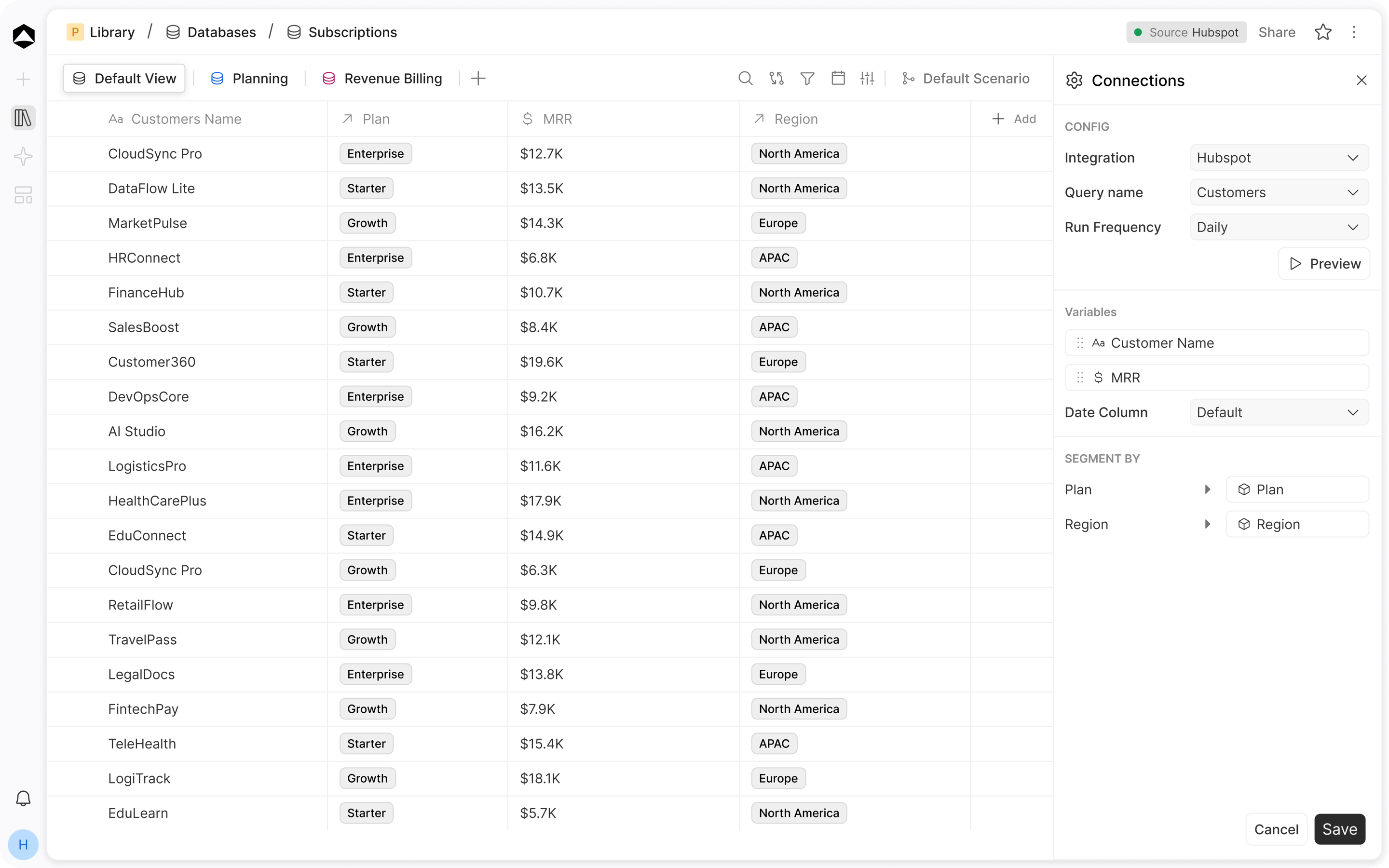
An Oculon subscriptions database synced from HubSpot: customer plans, MRR and region in one table, with connection settings for fields and segments beside it.

Subscriptions in Oculon. Source records stay connected, with fields and segments ready for planning.

HOW IT WORKS

Making source data
ready to use.

A revenue model needs more than a total; it needs to understand which underlying records the total represents.

01 / Sync

Records from source
With their refresh status

Use a billing or CRM source to populate the records behind your financial analysis, with refresh status visible alongside the data.

  • Connect, upload or start blank
  • Scheduled refresh over the range you choose
  • Millions of rows, searchable and filterable
02 / Context

Typed columns
Meaning, not just field names

Classify amounts, dates, identifiers and dimensions so “customer” or “close date” means the same thing in the model and the underlying data.

  • Columns mapped to variables
  • Dimension columns linked to members
  • Amounts summed into months by date
03 / Logic

Calculated fields
Logic on the data itself

Calculate a field or classify a transaction where it belongs, then use that enriched view in planning and reporting.

  • Calculated fields and metrics
  • Editable actuals where you need them
  • Reusable in every model
04 / Views

Saved views
The exact slice each team needs

Build a view for EMEA renewals or enterprise pipeline without creating another export that starts drifting out of date.

05 / History

Compare snapshots
See exactly what changed

Compare a prior data state with the latest one when a source update unexpectedly moves a metric.

06 / Foundation

One dataset
Every workflow

The same records can support forecast variables, performance boards and an agent investigation without rebuilding the data set each time.

IN PRACTICE

The data backbone behind every finance decision.

PPeople/EmployeesEdited just nowShare
SearchFilterView
Name◆Team◆Location◆Level$Salary◷Start
Liam ThompsonEngineeringLondonL4$142KMar 2023
Emma JonesSalesNew YorkL3$118KJan 2024
Ava DavisEngineeringBerlinL5$168KJul 2021
Noah GarciaFinanceLondonL3$104KFeb 2025
Olivia MartinezProductRemote · EUL4$136KSep 2022
Lucas WalkerSupportLisbonL2$58KNov 2025
Mia ChenMarketingNew YorkL3$112KApr 2024
142 employees · synced from Rippling 06:00 · salary visible to Finance only

One employee table feeds headcount, payroll and every team budget. Salaries stay visible to Finance only.

For People and finance teams · Employee database · Centralize employee records, compensation, benefits, teams, and locations to support headcount and workforce planning.Illustrative example · sample data

FAQs

How does Oculon Database scale as our data grows?

Oculon is designed to handle millions of rows per database, with views, filters, and search keeping large datasets manageable.

Does Oculon support real-time updates?

Yes. Connected applications can push changes continuously, with updates flowing through the databases and the Oculon experiences that use them.

Can I run custom logic on my data?

Yes. Use calculated metrics and structured fields to define business logic that can be reused across models and reporting.

How do I manage access?

Role-based permissions control who can view, edit, or manage data across Oculon.

Page preview · This destination is not built in the local prototype yet.