A familiar workspace, supercharged.

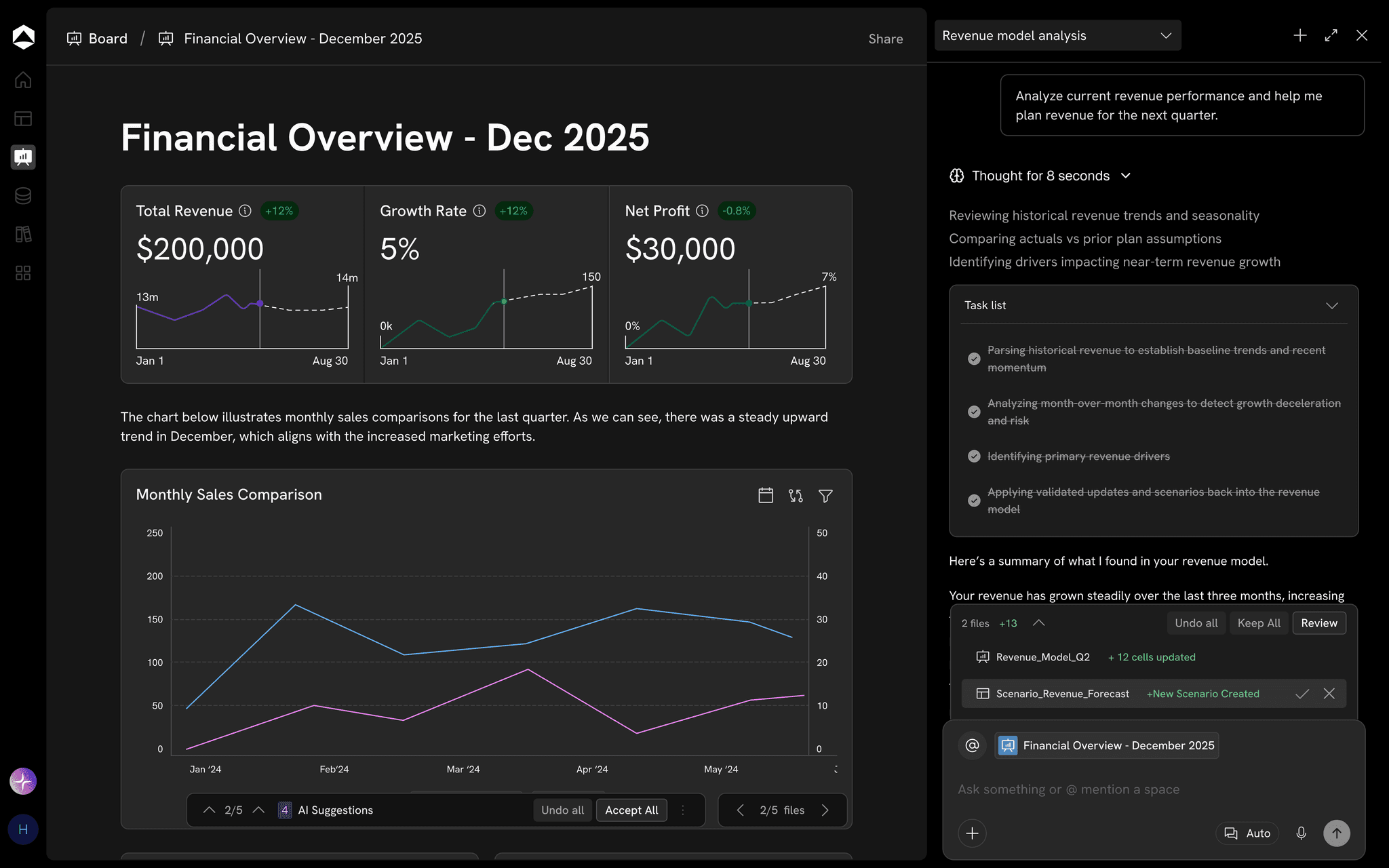
Bring the workbooks your team already runs on into Oculon. Ask questions of them, edit them in a grid that behaves like Excel, and combine them into one model where every value keeps its source.

Finance runs on spreadsheets. Oculon turns them into a live model.

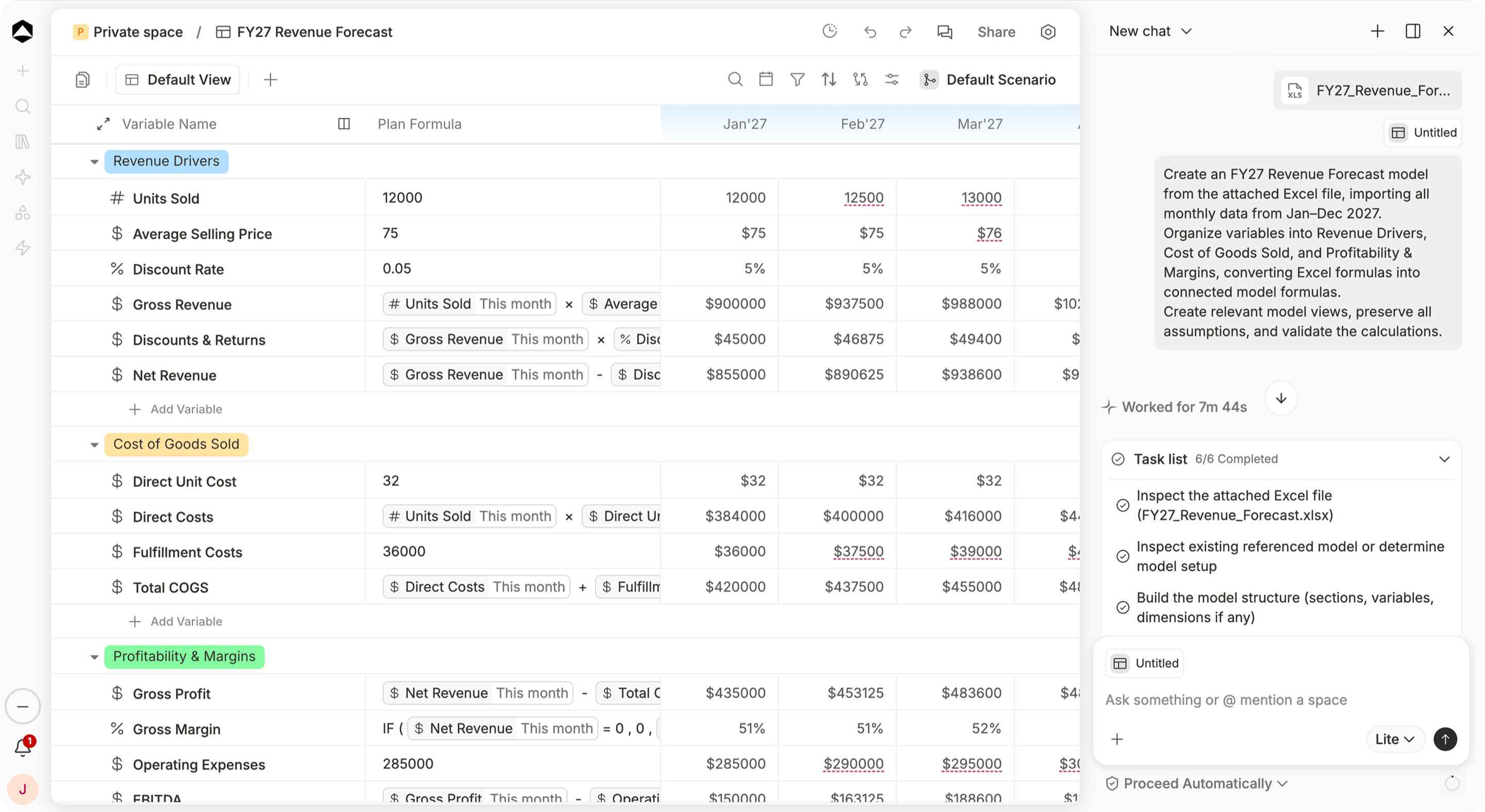
An Oculon FY27 revenue forecast built from an attached Excel file: drivers, costs and margins in the model, with the agent task list beside it.

FY27 Revenue Forecast in Oculon. Upload the workbook; the agent builds the model and keeps every value tied to its source.

HOW IT WORKS

Working with Excel
in Oculon.

Start with the files you already have. Oculon reads them, keeps their logic and links every number back to the sheet and cell it came from.

01 / Ask the workbook

Ask the workbook
Get the analysis back

Drop an operating plan, actuals export or CSV into Oculon AI and ask the question you would normally spend an afternoon on. Oculon reads every sheet, answers with the exact cells behind each number, and can hand back an updated workbook.

  • Excel, CSV, PDF and images in chat
  • Answers point to the sheet and cell they used
  • Results returned as an updated Excel file
02 / Edit in the grid

Edit in the grid
Watch the plan follow

The model grid works the way Excel does, with arrow keys, copy and paste, and formulas. The difference is that formulas reference named drivers, so raising Q4 win rate updates bookings, revenue and margin everywhere they are used.

  • Keyboard navigation, copy, paste and search
  • Formulas written with named variables, not cell coordinates
  • Every dependent value recalculated, across the model
03 / Combine workbooks

Combine workbooks
Into one connected plan

Upload actuals, headcount and pricing workbooks, choose the sheets you need, and Oculon combines them into one plan. Sheets are checked for matching headers before they merge, and every value shows the file it came from and when it was last refreshed.

  • Multiple workbooks and sheets in one import
  • Mismatched headers flagged before anything merges
  • File, sheet and refresh time on every value
IN PRACTICE

Built for the work
that matters.

BBoard/Board Pack · Q3.xlsxEdited just nowShare

Board pack · Q3

Excel template · pulled from Oculon 2 min ago

Revenue+6%$5.80M
Gross margin−1.1 pts70.3%
Runway+1 mo26 mo

Revenue grew 6% quarter on quarter to $5.80M, 3.3% below plan on renewal timing.

Gross margin closed at 70.3%; hosting moved into COGS in March.

Burn fell to $1.20M a month and runway is 26 months.

For FP&A teams · Build the board pack in Excel · Pull approved figures into the template your board already knows, refreshed to the latest close.Illustrative example · sample data

FAQs

Do we have to stop using Excel?

No. The add-in pulls Oculon models and views into Excel and pushes edits back, so your team can keep working in the grid it knows.

What happens to the formulas in an imported workbook?

Oculon maps them to named variables, so =B7*C12 becomes Units sold × Price per unit. Anything it cannot map confidently is flagged for review.

Do edits made in Excel go straight into the plan?

Pushed edits arrive as changes you can review, with their downstream impact, and every push is recorded in the audit trail.

Can I combine several workbooks or sheets?

Yes. Upload several CSV, XLS or XLSX files, choose the worksheets you need, and Oculon combines their rows into one dataset. Sheets must share the same columns; if one does not, Oculon names the file and sheet so you can fix it before anything merges.

Which files can I attach in Oculon AI?

Excel workbooks, CSV files, PDFs and images. Oculon reads the attachment, answers questions about it and can use it as context when building or updating a model.

Page preview · This destination is not built in the local prototype yet.