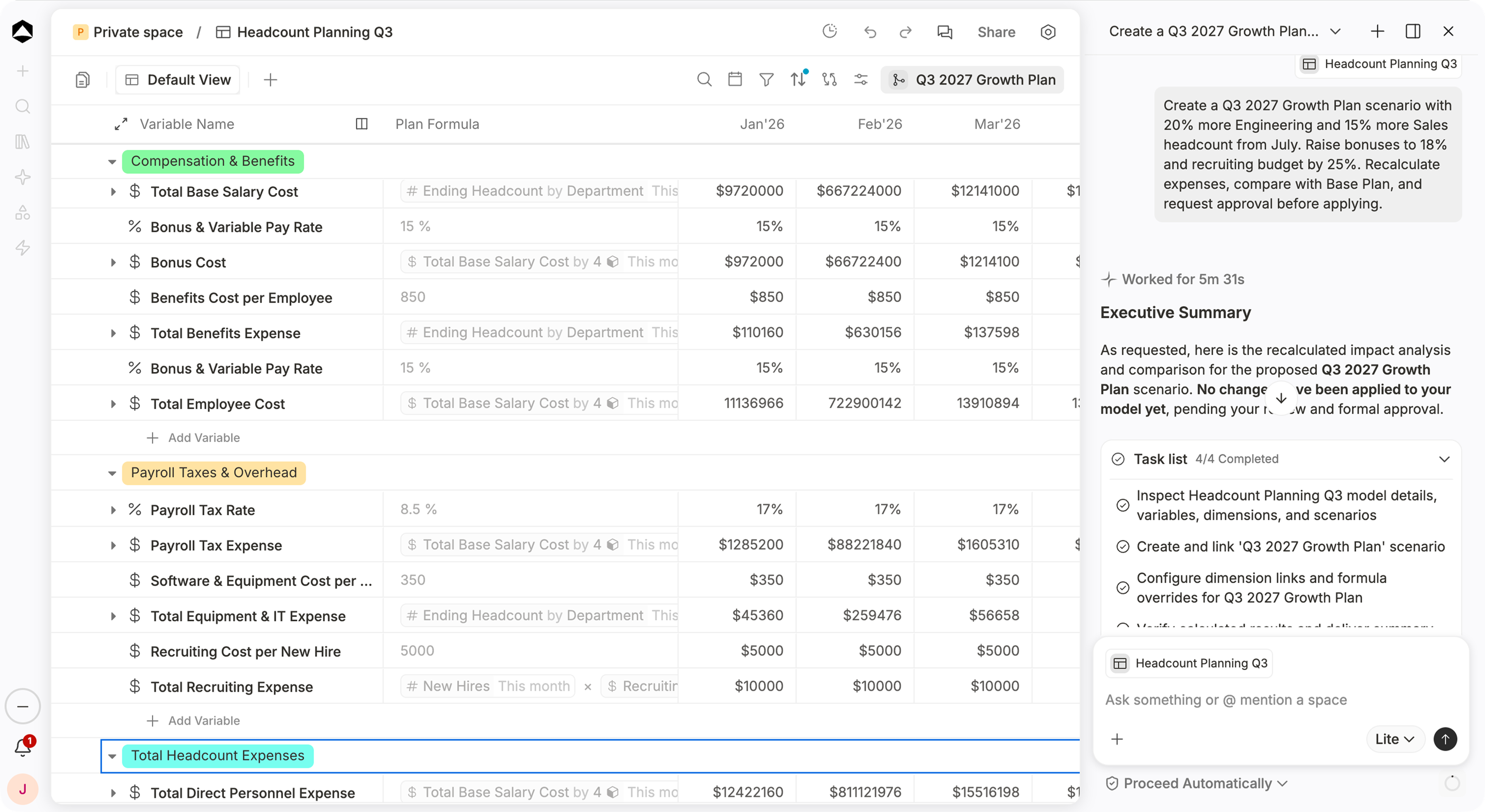
Explore the what-if without losing the actual plan.
Change a pricing assumption, hiring date or sales target in a scenario, compare what follows and move only an approved decision into Main.
Every plan needs a downside case. Test it without touching the plan you approved.
Headcount Planning Q3 in Oculon. Branch a growth scenario, review every change, and keep Main untouched until you accept.
HOW IT WORKS
Planning for different outcomes.
A what-if should answer a business question without creating another spreadsheet that drifts from the plan.
01 / Always current
Branch from Main Without copying the model
Create a Downside case that changes enterprise bookings in Q4 while keeping the remaining assumptions connected to Main.
Main412 vars
FY26 ForecastApproved · v13
Scenario
DownsideBranched from Main
Enterprise bookingsOverride−20%
Everything elseInherited411
Scenario2 overrides
UpsideBranched from Main
02 / Knock-on effects
One assumption Every knock-on effect
Delay a hiring start date and inspect the impact on payroll, operating expenses, cash burn and runway.
Engineering hires · startfxAprilJune
VariableMainHiring delayΔ
#Engineering hires · startAprilAprilJune—+2 mo
$Payroll · H1$2.94M$2.94M$2.70M—−$240K
$Operating expenses · H1$3.71M$3.71M$3.47M—−$240K
$Monthly burn$1.25M$1.25M$1.21M—−$40K
#Runway23 mo23 mo24 mo—+1 mo
03 / Compare
Compare outcomes On the same terms
Put Base, Upside and Downside next to each other across the variables and periods that matter for the decision.
Base$12.4M
Upside$14.1M+14%
Downside$10.8M−13%
Ending ARR ($M)DownsideBaseUpside
Downside · $10.8M
Q1Q2Q3Q4
04 / Act quickly
Answer in the meeting While the question is live
Move a hiring start date while the meeting is still going and watch runway update, so the decision is made while everyone still has the question in mind.
Engineering hiring startsAprMayJunJul
Runway16 mo19 mo
Monthly burn$1.31M$1.18M
Cash · Dec$21.4M$22.6M
Cash balance ($M)July startApril start
JanMarMayJulSepNov
05 / Adopt with control
Merge with control Approved changes only
Review every change and its impact first
Merge checks catch conflicts, including knock-on ones
Lock approved states and restrict who can edit
PSMerge Downside into MainRequested by Priya · 2 changes and 1 knock-onReadyMerged
Enterprise bookings · Q4$1.42M→$1.14M
Engineering hires · startApril→June
Runway26 mo→24 mo
No conflicts with MainChecked against 4 edits made since the branch
FY26 Budget is lockedApproved version · not affected by this merge
Who can mergeCFO and FP&A leads
Merge into MainCancel
IN PRACTICE
Put the decision into a scenario before you make it.
SStrategic Finance/Revenue DownsideCMEdited just nowShare
Revenue downside
Downside scenario · Main unchanged
Q4 revenue · Base$6.02M
Downside−10%$5.41M
Runway · Downside−3 mo23 mo
Revenue by quarterBaseDownside
What changed in Downside
DriverBaseDownside
Win rate22%18%
Sales cycle74 days90 days
Churn1.0%1.3%
HiringOn planOn plan
The Downside keeps Main untouched: slower wins and longer cycles cut Q4 revenue by $610K and runway by 3 months.
For CFOs · Revenue downside · See what slower growth or conversion does to revenue, cash, and runway.Illustrative example · sample data
For People and finance teams · Hiring plan · Compare different hiring speeds or start dates before committing to the headcount plan.Illustrative example · sample data
SStrategy/EU Expansion CaseEdited just nowShare
SearchEU launchCompareView
VariableTrendFormulaFY26FY27FY28
Investment
$Launch cost$ Team+$ Marketing$1.8M$0.6M$0.4M
#EU team# Plan81420
$EU payroll# Team×$ Salary$1.1M$2.2M$3.1M
Return
$EU new ARR# Logos×$ ACV$0.9M$3.4M$6.8M
$Contribution$ ARR−$ Cost−$2.0M$0.6M$3.3M
#Payback (months)$ Cost÷$ Contribution——27
For Leadership teams · Investment decision · Test a new product, market, or capacity investment against the financial outlook.Illustrative example · sample data
SStrategic Finance/Cost ResponseEdited just nowShare
SearchCompareView
VariableTrendFormulaBaseOption AOption B
Levers
#Hiring freeze# PlanNoneQ3Q3 + Q4
$Marketing spend$ Budget$1.3M$1.1M$0.9M
$Contractors$ SOW$95K$60K$40K
Result
$Monthly burn$ Opex−$ Revenue$1.23M$1.04M$0.91M
$New ARR · FY26# Reps×$ Quota$9.8M$9.5M$8.7M
#Runway (months)$ Cash÷$ Burn242831
For Finance leaders · Cost response · Understand which changes to hiring or spend protect runway if performance falls below plan.Illustrative example · sample data
BBoard/Capital PlanCFEdited just nowShare
Capital planning
Founders and CFO · three cases on one board
Cash today$34.0M
Raise in Q3 FY27$40M
Runway · no raise34 mo
Runway · with raise+40 mo74 mo
Cash balance by quarter ($M)No raiseRaise in Q3 FY27
Assumptions
CaseGrowthBurn
Base38%$1.0M
Raise52%$1.0M
Default alive24%$0.8M
Raising $40M in Q3 FY27 extends runway to 74 months. At a $1.0M monthly burn, today’s $34.0M lasts 34 months without it.
For Founders and CFOs · Capital planning · Compare different growth, burn, and fundraising assumptions before deciding when additional capital may be needed.Illustrative example · sample data
FAQs
Can I create more than Base, Upside, and Downside?+
Yes. Oculon supports Base, Upside, Downside, and custom scenarios with independent model states.
Can assumptions and formulas differ between scenarios?+
Yes. Each scenario can carry its own assumptions and formula context, so different futures can reflect different operating decisions.
Can I compare scenarios side by side?+
Yes. Oculon provides a dedicated comparison experience so Finance can see how assumptions and resulting outcomes differ across scenarios.
How do scenario changes become part of the plan?+
Approved overrides can be merged back into Main after the relevant checks, so Finance can adopt the changes it wants without manually recreating them.